Which AI Storyboarding Tool Is the Best for Filmmaking?
By Drawstory team
Dec 5, 2025
Which AI Storyboarding Tool Is the Best for Filmmaking?
In the last two years, the filmmaking industry has shifted dramatically. Directors, studios, and animation teams are now relying heavily on AI tools for filmmakers - not as a replacement for artists, but as a way to speed up pre-production, improve visual clarity, and pitch ideas more effectively.
Storyboarding is one of the areas changing the fastest. But with so many solutions appearing, the biggest question becomes:
Which AI storyboarding tool actually works for filmmakers, not just generic content creators?
This article summarizes key insights from a recent conversation with a director and CG veteran with 25+ years of industry experience. He leads a motion team inside a major global agency (VML / WPP), creates independent animated films, and actively experiments with AI storyboarding for pitch decks, trailers, previs, and visual development.
His experience gives a clear picture of what works, what doesn’t, and where storyboarding AI truly adds value.
The Real Challenge: AI Storyboards Aren’t “There” Yet for Fantasy Worlds
Many directors feel the same thing this director expressed:
“It’s easy to storyboard a car commercial. But when you’re creating fantasy characters or stylized worlds, AI still struggles.”
This is the biggest gap in most ai for storyboarding solutions today:
Hard-to-replicate custom characters
Lack of artistic decisions (composition, angles, acting)
Generic frames that don’t feel cinematic
Inconsistent faces from shot to shot
Traditional storyboard artists still bring depth that current models can’t fully automate.
Where AI Is Working Today
Even though fully automated storyboards are hit-or-miss, filmmakers are using AI successfully in three major areas.
1. Previsualization (Previs) & Look Development
Large studios and agencies are now adopting AI to quickly:
Generate environments
Test shot ideas
Replace mood boards
Visualize complex worlds before modeling/animation
The director we interviewed uses AI daily for concept art and previs inside WPP’s AI platform.
2. Pitch Deck Creation
This is currently the strongest use case.
Directors generate cinematic stills → import them into PowerPoint/Canva → create a polished pitch deck.
“My pitch deck’s quality is dramatically better now. AI lets me fully visualize scenes I wrote years ago.”
For pitch decks, AI doesn’t need perfect storyboards. It needs recognizable characters, emotions, and environments - and that technology is already reliable.
3. AI-Assisted Trailers and Teasers
Pitch decks alone are no longer enough.
Most filmmakers today need:
A short video
A teaser
A proof of concept
Directors use AI to transform storyboard sequences into short videos to convey emotion, pacing, and character personality - something still images can’t do alone.
Why Directors Still Want a Reliable AI Storyboarding Tool
Even though AI-generated storyboards are inconsistent, the demand keeps growing.
Directors want:
Character consistency
Cinematic framing
Fast iterations
A way to visualize scenes before spending money on artists
A tool they can use alongside real storyboard artists
Not to replace artists, but to speed up early development and communication.
The interviewed director said:
“For me, it’s either I hire a storyboard artist or I use AI. Everything else is iterative.”
This is exactly the gap a modern ai storyboarding tool should solve.
Where Drawstory Fits In
Based on the challenges above, filmmakers are adopting Drawstory because it solves the practical parts of pre-production - even if AI isn’t fully artistic yet.
Drawstory is built specifically for filmmaking workflows:
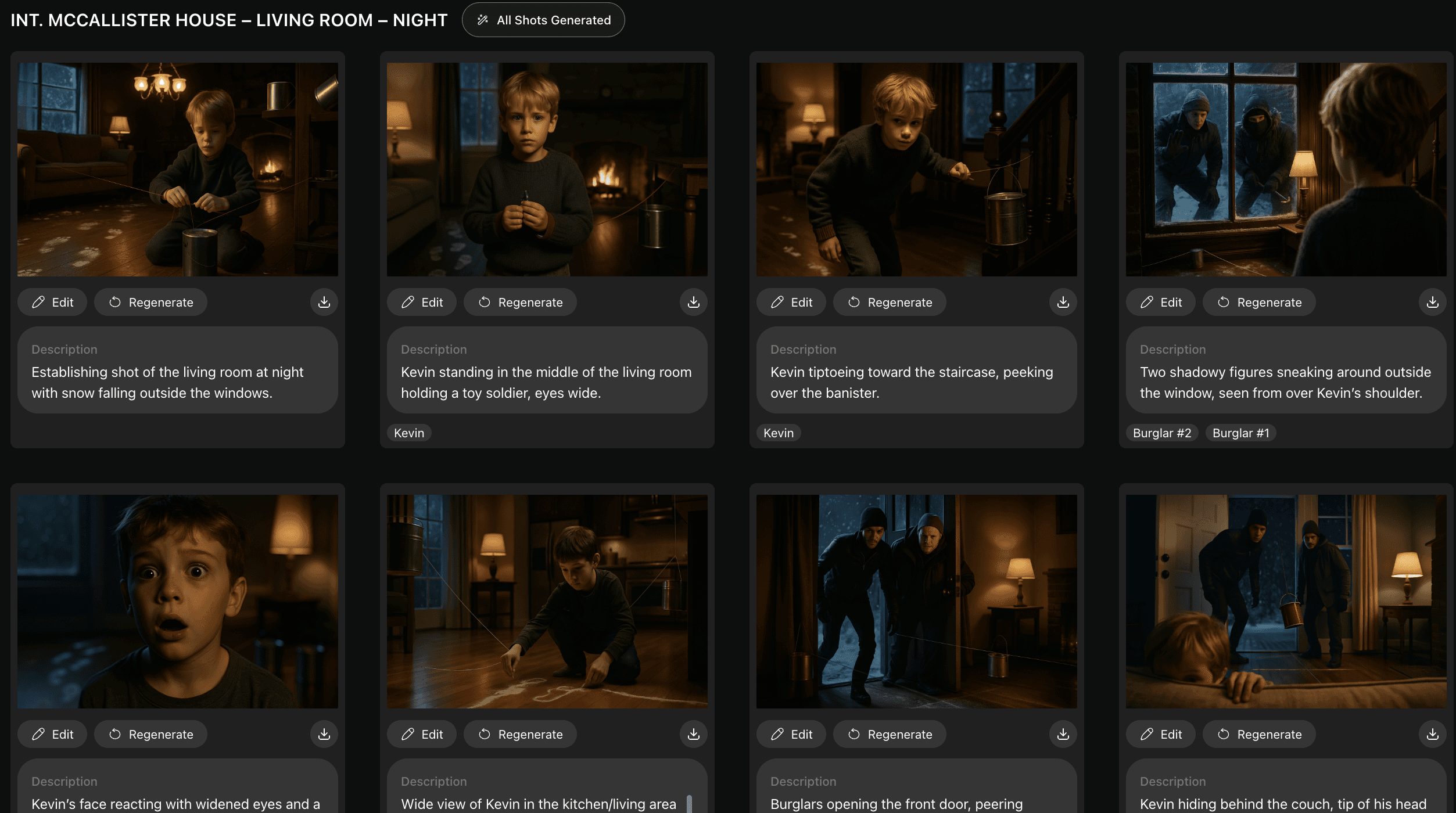
1. Script to Visuals in Minutes
Directors upload or paste their script, and Drawstory generates all the shots.
This helps them:
Explore scenes
Visualize characters
Test camera language
Prepare pitch materials
2. Perfect for Pitch Deck Creation
Most directors generate visuals in Drawstory → export → design their deck in Canva, PowerPoint, or Google Slides.
You don’t need perfect storyboards - just clear, expressive frames that represent your story.
3. Fast Character Exploration
Fantasy characters, stylized worlds, or non-human designs are where most AI systems break.
Drawstory supports consistent characters through its Cast feature, helping filmmakers keep the look of their characters across scenes.
4. Built for Directors, Not Casual Creators
Drawstory was created by filmmakers for filmmakers—its workflows match real production pipelines, not generic image generation.
No other generic image generator (Midjourney, Gemini, etc.) is optimized for script-driven filmmaking workflows.
So which AI Storyboarding Tool Is the Best?
Here’s the real answer:
If you want polished stills for pitch decks:
➡️ Use Drawstory
It gives you fast, consistent, script-based visuals - ideal for decks and early look-dev.
If you want generic images or mood boards:
➡️ Midjourney or Gemini
If you want AI filmmaking tools beyond storyboarding:
➡️ LTX Studio (currently experimental but promising)
If you need character-consistent shots, not random AI frames:
➡️ Drawstory is the strongest option because it was built specifically for filmmaking, not general image generation.
Final Thoughts
AI is reshaping the pre-production world for directors.
While full automated storyboarding AI still has limitations, AI already excels at:
Visualizing scripts
Creating pitch decks
Generating teaser videos
Helping directors communicate their vision
Speeding up early exploration
And among all tools available, Drawstory stands out as the most practical and filmmaking-focused AI storyboarding tool today.